
How to Start a Blog using Blogger – A Step by Step Guide for Beginners

Starting a blog in 2021
can be a superb idea because with the help of blogging you can express your thoughts and share anything with the world. Also If you are wise in this field, then you can earn a decent income from it.
Each day, millions of articles/posts/stories get published in the web, and more than 200 thousand new blogs created. It means more than two new blogs published every second. Isn’t Amazing? So many blogs are springing up daily with their various topics, and many of them became famous in the world. So, now It’s your turn!
Suggested Reading – Why Blog? Here are Some Reasons You Should Start Your Own Blog
So If you’re new to blogging and planning to start a blog for free, then you’re in the right place. In this article, I’ll show you how to create a blog on blogger.com (Google’s own free blogging platform).
Before we start let me tell you some interesting fact about Google Blogger/B
What is Google Blogger?
Blogger.com is Google’s own free blogging platform where you can create a free blog with the .blogspot.com subdomain (for example, yourblogname.blogspot.com) or you can buy a domain (always recommended) to have your perfect website (for example, www.yourdomain.com).
Advantages of Starting a Blog on Google Blogger
So, I hope now you can understand, why starting a blog on Blogger.com is beneficial for you.
OK, now let’s see how you can start your blog with blogger using our step-by-step guide below.
How to Create a Free Blog with Blogger.Com
Sign Up for a Google Account
Sign in to your Blogger Account
Choose a Blogger Profile
Create your blog
Choose your blog title, address and theme
Lunch your blog
Great! You have finished your google blog creation. Now your blog is running, and it’s live for all.
However, just creating a blog is not enough. There are many changes that you need to do after creating your blog setup. Now it’s time to optimize it for more search engine visibility and better user experience.
Steps to Optimize your blogger blog
In your blog dashboard left side panel you can see the “Setting” option. Now click there to edit some stuff.
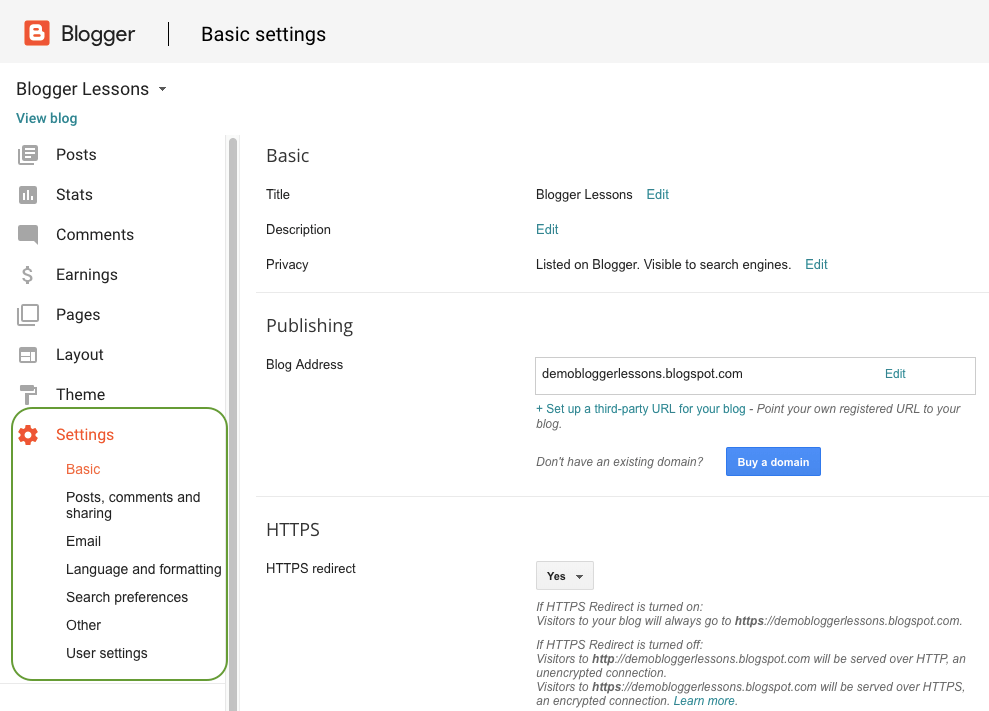
Add a Description for your Blog

Adding a description on your blogger blog is very necessary, it helps to describe your reader and search engines that what is your blog about. You can set it by selecting the “basic” settings option under the main settings panel.
Edit your post, comments and sharing settings on blogger

This section will help you to optimize your blog homepage, and you can set up commenting rules for your blog readers. These settings are pretty self-explanatory, and if you have any difficulty to understand, then you can click on the help symbol (question mark symbol) to get more details about it.
Edit and modify Blogger Search Preference Settings to Optimize your Blog SEO
In this section, you can optimize your blog for search engines. With the help of these setups, you can able to get better ranking in search engine.

Edit meta tags: A meta tag is a brief and concise summary of your blog or website. It supposes to install after the title of the page. The user of a search engine focuses on the description of the post after reading the title of the post. So, Keep in mind that it is very much necessary that your meta description must be related to what you have written in your blog. Your meta tag description must be written within 150 characters.
Custom page not found: When someone lands on your site through a URL that no longer exists, you can set a message to them that the page doesn’t exist. You can set any custom text or HTML message instructing them what to do next.
Custom redirects: Using this feature you can redirect your full-length permalinks to a shorter one and also you can redirect your broken links to your site. Bloggers custom redirects only support redirection within the same blog URL, so this isn’t suitable if you’ve changed your blog domain name.
Crawlers and indexing: These features are imperative because doing proper setup there, a chance to get better ranking in search engine and incorrect configuration can harm your SERP(Search engine ranking position) or you may lose your search engine visibility. So stay away from this part, if you are not expert.
However, if you are keen to optimize your robots.txt and Custom robots header tags, then you can read the post below.
Further Reading – Blogger Advance Search Engine Optimization (SEO) Setup
You just finished essential SEO setups for your blogger blog. Now it’s time to customize your blog.
How to Customize your blogger blog?
In your blog dashboard left panel section, you can see “Theme” and “Layout” option. There you can do your all customization stuff like new template installation or modification, edit or remove blogger widgets, logo setup, text color, and style edit and many more.
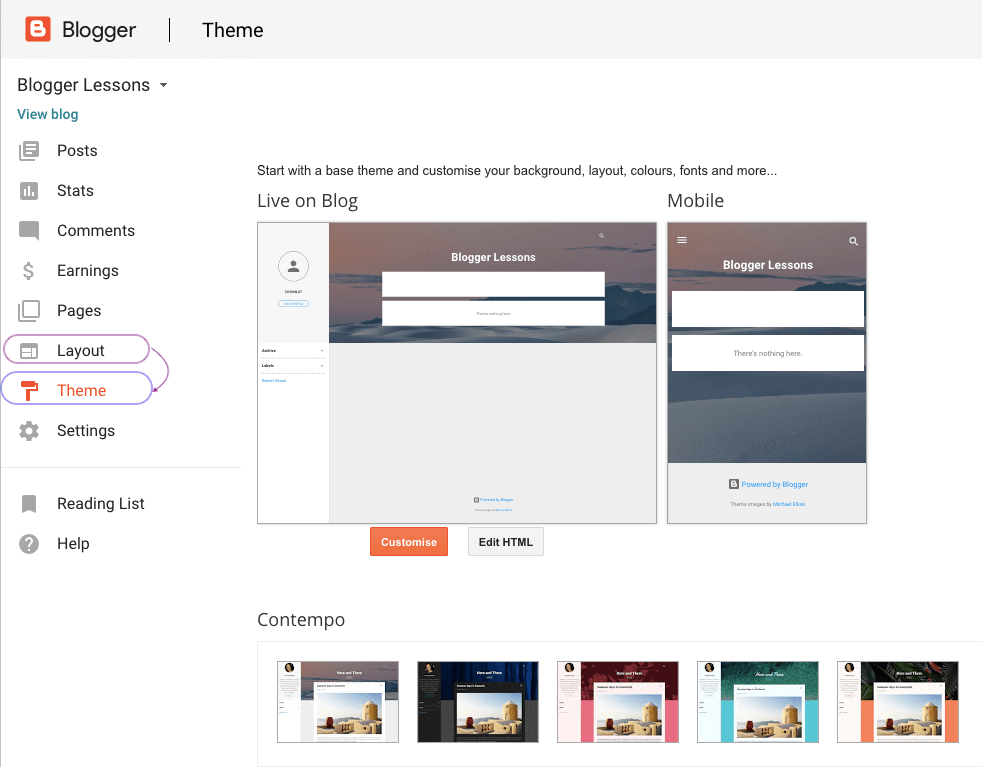
Customization allowed in blogger theme and Layout Section
So, I hope you are done finishing your blog setup and customization. Now it’s time to publish some post and pages that drive traffic to your blog.
How to Publish your article on blogger blog
Once you are ready to publish your first article(post), you need to go to “Posts” tab from your blog dashboard and then click on “New Post” or “Create a New Post” link to write your content.
Now you can see blogger post editor. Here’s how the blog post editor screen looks like –

Now get ready to write an article in a proper format at Compose section. The blogger post editor is similar to the MS Office or Google doc, so it’s very easy working with.
After finishing your article writing chose a suitable post title for it and inserted it on post title area. You can make your article more attractive by adding Headings, Sub-Headings, images, videos, etc. Now when all you are done click on ‘PUBLISH’ button to see your Blog Post live.
Congratulation for your first post! Now you’re ready for blogging.
Keep the process going on and start publishing more contents on your blogger blog. After posting some good stories(or articles), you can apply for Google Adsense approval, or you can try for any other advertising platform. This way you to earn money from your free blogger blog.
Here are a few more things I suggest you to consider when you are running a free blog on blogger.com
So, this is my complete guide on how to create a blog on blogger. If you have any questions or doubts in mind, don’t hesitate to let me know by commenting below.
If you found this guide helpful, kindly give it a share. Your share is very much helpful to spread our message and help more bloggers like you.
Thank you for reading this.
Hope you like it .
Share it with your friends and family.
Comments if you have any queries.


No comments:
Post a Comment