
Instagram Stickers: The Underrated Feature That Can Take Your Stories Further

When Instagram Stories first launched in 2016, it introduced new opportunities for brands and users alike to be more authentic and creative on the platform.
Now this fleeting media format with a 24-hour lifespan has become a pillar in most Instagram marketing strategies, complementing the posts you publish permanently to your feed.
But there’s a powerful feature within stories that many brands still ignore: Instagram Stickers.
It’s easy to mistake stickers as mere aesthetic add-ons, but using the right Instagram Stickers at the right time not only makes your stories more fun, but can help you achieve a variety of your marketing goals, from reaching new audiences to mastering how to make money on Instagram.
How to use Instagram Stickers: The basics
Instagram Stickers are dynamic graphic elements that can be added to both image and video stories. Some are animated, some are clickable, and others even allow users to interact directly with the story. Simply put, they make your stories more interesting, which makes users more likely to engage with them.
Stickers can be found after you’ve taken or uploaded your photo or video by tapping on the sticker icon in the top right corner of your stories’ editing options.
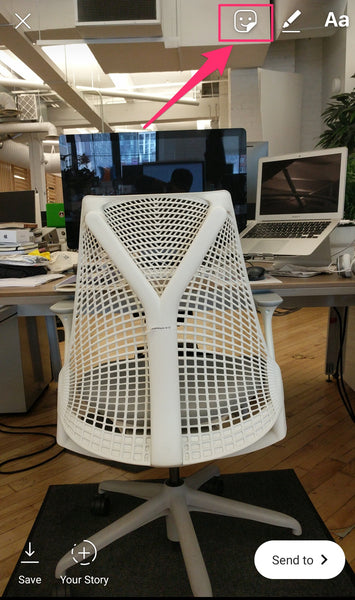
Once you tap on this icon, you’ll see a list of Instagram Stickers. Customizable stickers will show up first, including the Hashtag, Mention, and Location Stickers. All others can be found by scrolling down or by searching for what you’re looking for.
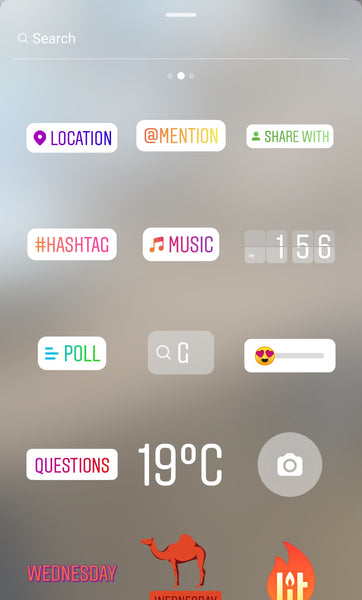
Once you've selected a sticker, you can layer it on top of your story, dragging it where you want it, pinching it to resize it, and tapping to cycle through different styles if they're available.
The 10 essential types of Instagram Stickers
While some stickers help to make your stories more fun, others directly contribute to your Instagram marketing goals. There’s no shortage of options to choose from, but the following customizable stickers are especially relevant for marketing:
- Hashtag stickers add a clickable hashtag to your story to help you reach more users or promote your own branded hashtags. When users click on it, they’ll be taken to the hashtag’s feed, just like if they’d searched for it manually. You can also add clickable hashtags using the text box tool in your stories, but it won't be as noticeable.
- Mention stickers tag another user in your stories, notifying them that you’ve done so. When someone taps on the sticker, they’ll be taken to the tagged user’s profile. You can also mention other users in your caption itself, for a similar but more subtle effect.
- Location stickers tag a location in your story to expand your reach. When users tap on it, they’ll see a feed of other content with the same location tag. You can only add one per story, so choose the most relevant one.
- Question stickers let you crowdsource ideas, feedback, and responses from your audience with an open-ended question. Answers can then be shared directly to your stories as a follow up post.
- Poll stickers ask users a question, and give them two answers to choose from. By default, you can ask a “yes or no” question, or you can change the responses to create your own either/or styled inquiry that lets users choose between two answers. Users click on the sticker to answer, and the results are calculated in real time. You can see who voted and what they voted for, giving you the opportunity to engage directly with them.
- Product stickers are available through the Shopping on Instagram integration. Business accounts with this sales channel enabled will be able to tag products in their stories. Users can tap to see the price, description, and product name, and tap again to go directly to the product page to purchase. (Note: Without this integration, you'll have direct followers to click the link in your Instagram bio.)
- Music stickers add background music to your images or videos, letting you choose a soundtrack from Spotify.
- Emoji slider stickers ask users a question that they can answer with a slider (i.e. on a scale of 1 to 10), such as “how much do you love our new line compared to last year.” You can choose an emoji to represent their response, and users will be able to see the average after they give you their vote.
- GIF stickers are looping graphics from GIPHY that you can add to stories. They’re not just fun and dynamic, but can be used to add animated calls to action to your stories (e.g. “Follow us”, “Swipe up”, etc.).
- Date stickers will show the date that the photo, video, or story was created. They can be used to post throwback content to reminisce about the past, or build hype for an upcoming event by displaying today’s date.
Naturally, you can mix and match stickers in the same story to layer the benefits on top of each other and maximize their impact.
Thanks
If you have any queries then ask in comment section below.


No comments:
Post a Comment